Getting Started with Yale Linus® Smart Lock L2 Lite
Here you can find getting started help and tips for the Yale Linus® Smart Lock L2 Lite.
Getting Started FAQ
This question has its own page. Click here to read full answer.
There are a few different options for installing the Yale Linus L2® Lite Smart Lock, as below:
- If you have a Euro profile/DIN cylinder lock, you may well be able to install the Linus lock over your existing cylinder. To double-check this, please go to our compatibility checker.
- If you find you need a replacement cylinder, we have a fully adjustable cylinder specifically for the Linus Smart Lock range. Please find more information here.
- If you have a 22mm Round Cylinder/Swiss lock, you can install the lock using the included adhesive backer.
Although we try to be compatible with as many locks as possible, if you have a Euro profile/DIN cylinder there is a chance that you may need to change the cylinder. You can check this using our compatibility checker.
If you find you need a replacement cylinder we have a fully adjustable cylinder specifically for your Linus L2 Lite Smart Lock. Please find more information here.
Dimensions: 62mm Diameter x 72mm Height
Weight: 260g (without batteries)
The Yale Linus® Smart Lock L2 Lite is designed to offer hassle-free installation. There is no drilling or damage to the door and with the step-by-step instructions provided, installation is quick and simple.
Our step-by-step DIY guides makes installation quick and effortless, with helpful tips and visuals to guide you along the way: Click Here
No, the Linus® Smart Lock L2 Lite is powered by the 3 x CR123A batteries supplied in the box.
This question has its own page. Click here to read full answer.
The Yale Linus® Smart Lock L2 Lite offers simple, secure control through the Yale Home app when you’re within Bluetooth range.
For broader smart home integration, L2 Lite supports Matter over Thread, enabling compatibility with a wide range of popular devices and platforms. This means you can manage your lock locally or remotely via your preferred smart home system.
Because L2 Lite doesn’t include built-in Wi-Fi, connecting to third-party devices that don’t support Matter over Thread requires the Yale Connect Wi-Fi Bridge (sold separately). The bridge also unlocks full remote access through the Yale Home app, so you can control your lock from anywhere.
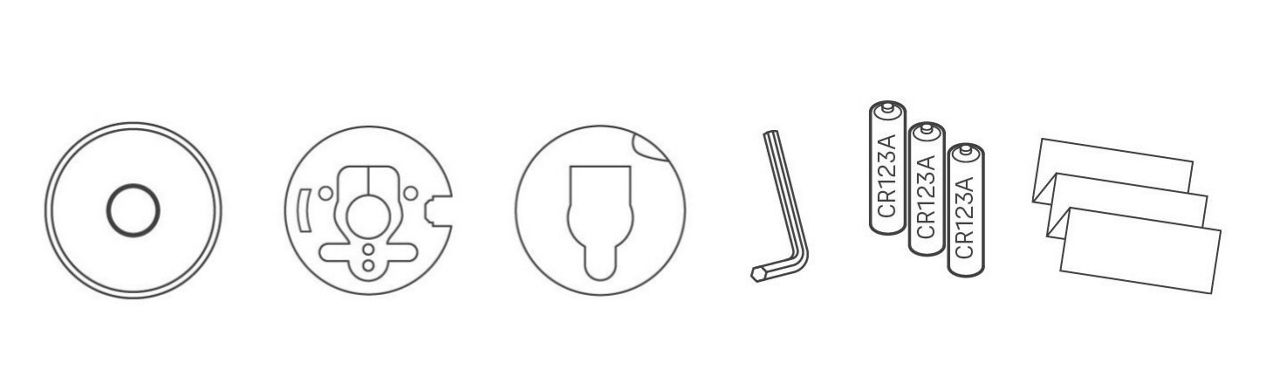
- 1 x Yale Linus® Smart Lock L2 Lite
- 1 x Mounting plate
- 1 x Mounting plate adhesive tape
- 1 x 2.5mm hex key
- 3 x CR123A Batteries
- 1 x Quick start guide
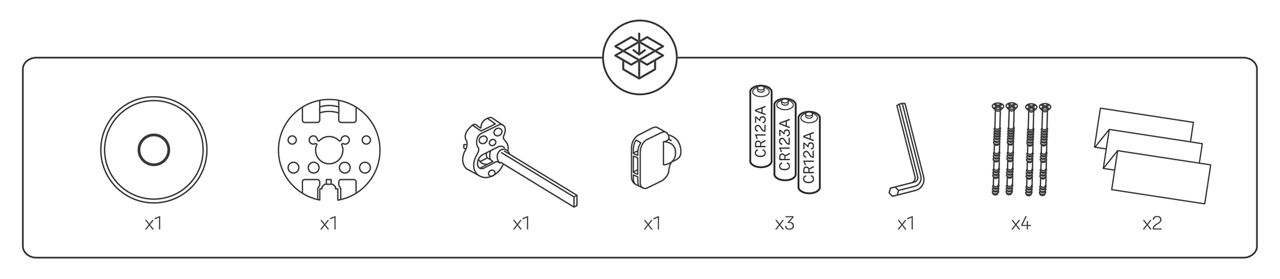
- 1 x Yale Linus® Smart Lock L2 Lite
- 1 x Mounting plate
- 1 x Shift adaptor with thumb-turn follower
- 1 x Thumb-turn follower adaptor
- 3 x CR123A Batteries
- 1 x 2.5mm hex key
- 4 x M5 Cuttable screws
- 1 x Quick start guide
Yale Home is the application to use on your Smartphone. The app is available on the Apple App Store or Google Play.
Download the Yale Home App from the links below.


Once you have downloaded the Yale Home app you will need to click on 'Create an account' or 'Sign in' if you already have an account.
To remove the battery cover:
- Press down on the side button to release the holding clip.
- While holding the button, pull the cover back to remove it.
To reattach the battery cover:
- Slide the cover back into place, ensuring it is aligned with the clip.
- Push gently until you hear a click, confirming it is securely attached.
The Linus® Smart Lock L2 Lite will automatically power on when the batteries are inserted. Once the last battery is connected, a white LED will pulse around the KeySense button along with a power up chime sound.
Please note: When the lock has been calibrated, removing and reinserting batteries will start an automatic calibration process, ensuring the L2 Lite is fully locked.
To locate the QR code to setup the Yale Linus® Smart Lock L2 Lite on your Yale Home app, please follow the steps below.
- Firstly, remove the locks battery cover. Press down on the side button to release the holding clip.
- While holding the button, pull the cover back to remove it.
- The QR code is located beneath, on the front of the lock.
The KeySense feature on the Linus® Smart Lock L2 Lite is activated by a physical button located at the center of the device. Pressing this button allows you to control the lock without using the app.
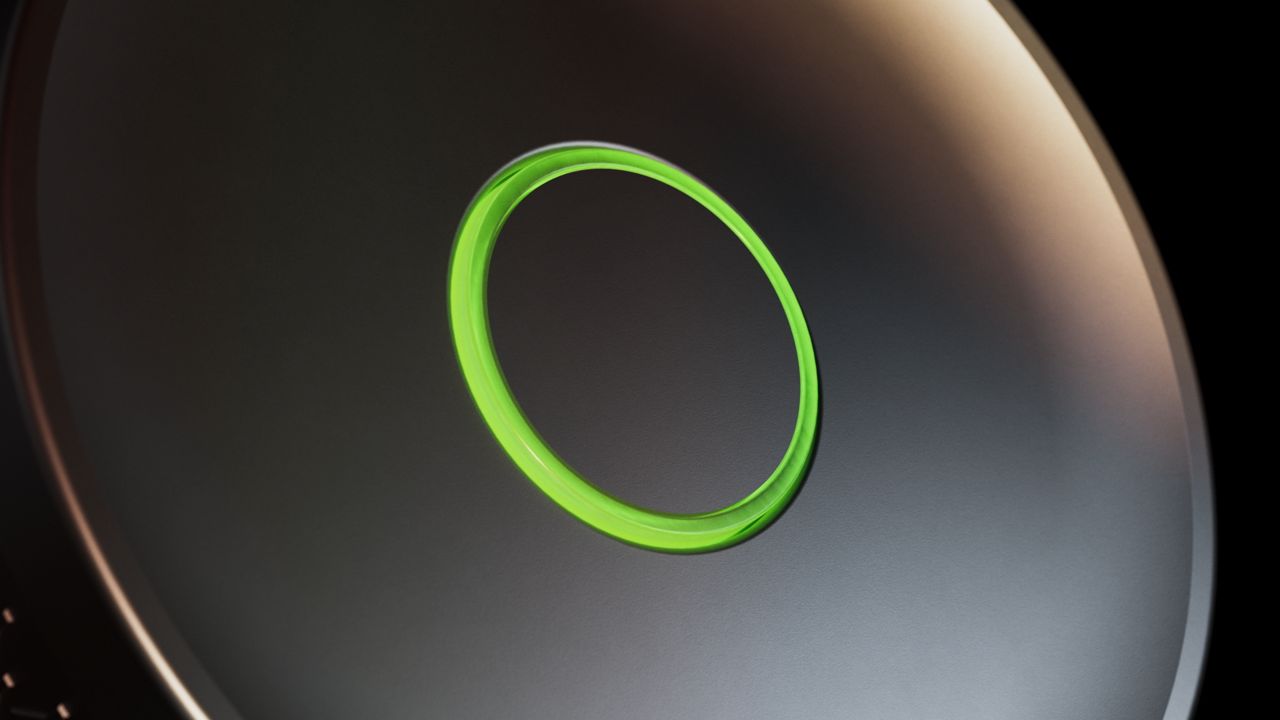
KeySense supports two main functions:
Lock and Unlock Immediately
- Quick press the button to immediately lock or unlock the door.
Lock After Delay
- Press and hold the button to activate a delayed locking sequence (the delay period is configured within your Yale Home app).
- This is useful when leaving your home—after holding the button, you’ll hear a sound notification, and the lock will automatically engage after a short countdown.
No. The Yale Linus L2 Lite is not IP‑rated, which means it has no certified protection against water or dust. Because of this, it is not waterproof and should not be used outdoors or in any location where it may come into contact with rain, moisture, or high humidity.
All products in the Linus Smart Lock range are designed for indoor use only. Using the lock in outdoor or exposed environments can:
- Affect its performance
- Shorten its lifespan
- Result in conditions that may not be covered by the product warranty
For the best reliability and longevity, the Linus L2 Lite should be installed on interior doors in dry, sheltered environments.
The Yale Linus L2 Lite supports Matter over Thread, which means it can connect to—and be controlled by—a wide range of smart home systems using a fast, secure, and energy‑efficient wireless network.
Here’s what that means in simple terms:
What Is Matter?
Matter is a universal smart‑home standard that allows devices from different brands to work together seamlessly.
- It uses internet‑based technology (IP) for reliable communication
- No cloud hub is required, improving security and privacy
- Works with major platforms like Apple Home, Google Home, Amazon Alexa, and Samsung SmartThings
What Is Thread?
Thread is a low‑power wireless networking technology designed specifically for smart home devices.
- Creates a mesh network where devices help each other stay connected
- Offers strong security and stability
- Uses very little power, ideal for battery‑powered products like locks
How Do Matter and Thread Work Together?
- Matter provides the common language smart devices use
- Thread provides the network they communicate over
- Matter also works over Wi‑Fi, but Thread is typically better for small, always‑on devices
What This Means for the Linus L2 Lite
Because the Linus L2 Lite supports Matter over Thread:
- It can be controlled using multiple major smart‑home platforms
- It can work with other Matter‑compatible devices, even from different brands
- It benefits from a secure, stable, and energy‑efficient Thread network
- It fits easily into modern, multi‑ecosystem smart homes
If you need additional support
You can get a more visual help related to our products at our download center and in our library for support videos.


Need more help?
This question has its own page. Click here to read full answer.
There are a few different options for installing the Yale Linus L2® Lite Smart Lock, as below:
- If you have a Euro profile/DIN cylinder lock, you may well be able to install the Linus lock over your existing cylinder. To double-check this, please go to our compatibility checker.
- If you find you need a replacement cylinder, we have a fully adjustable cylinder specifically for the Linus Smart Lock range. Please find more information here.
- If you have a 22mm Round Cylinder/Swiss lock, you can install the lock using the included adhesive backer.
- Scandinavian and Finnish locks require the thumb-turn follower and shift adapter included with the regional Linus L2 Lite variant.
Please Note: Linus L2 Lite is not compatible with ABLOY 4190 or LC190 lock cases used in Scandinavian and Finnish door configurations.
Although we try to be compatible with as many locks as possible, if you have a Euro profile/DIN cylinder there is a chance that you may need to change the cylinder. You can check this using our compatibility checker.
If you find you need a replacement cylinder we have a fully adjustable cylinder specifically for your Linus L2 Lite Smart Lock. Please find more information here.
- Dimensions: 62mm Diameter x 72mm Height
- Weight: 260g (without batteries)
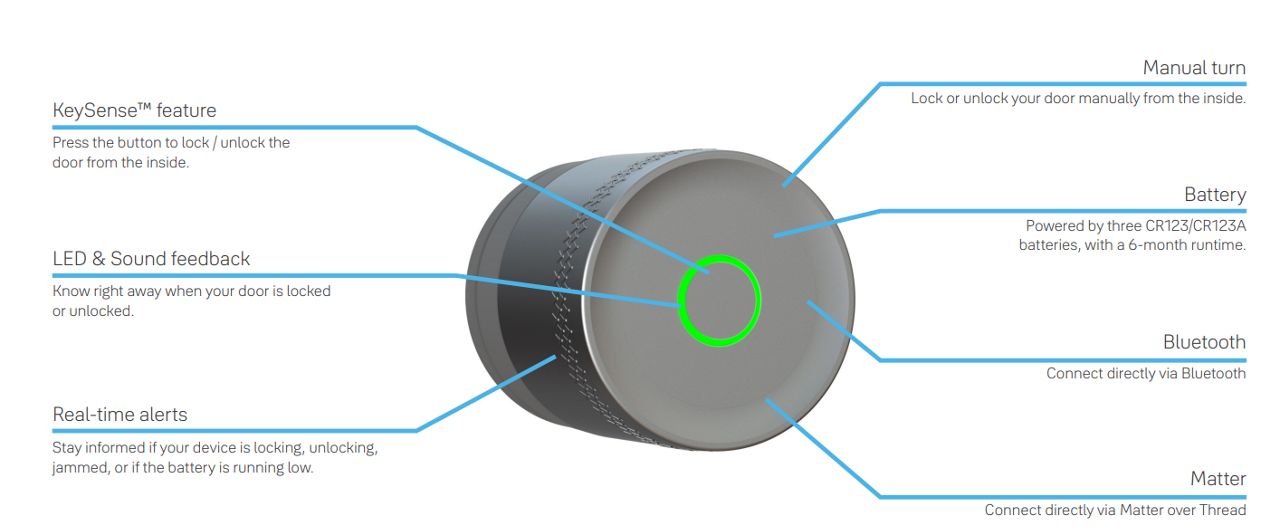
- KeySense™ feature
Press the button to lock / unlock the door from the inside. - Matter
Connect directly via Matter over Thread. - Real-time alerts
Stay informed if your device is locking, unlocking, jammed, or if the battery is running low. - Manual turn
Lock or unlock your door manually from the inside. - Battery
Powered by three CR123A batteries, with a 6-month runtime. - Bluetooth
Connect directly via Bluetooth. - LED & Sound feedback
Know right away when your door is locked or unlocked.
The Yale Linus® Smart Lock L2 Lite is designed to offer hassle-free installation. There is no drilling or damage to the door and with the step-by-step instructions provided, installation is quick and simple.
Our step-by-step DIY guides makes installation quick and effortless, with helpful tips and visuals to guide you along the way: Click Here
No, the Linus® Smart Lock L2 Lite is powered by the 3 x CR123A batteries supplied in the box.
This question has its own page. Click here to read full answer.
The Yale Linus® Smart Lock L2 Lite offers simple, secure control through the Yale Home app when you’re within Bluetooth range.
For broader smart home integration, L2 Lite supports Matter over Thread, enabling compatibility with a wide range of popular devices and platforms. This means you can manage your lock locally or remotely via your preferred smart home system.
Because L2 Lite doesn’t include built-in Wi-Fi, connecting to third-party devices that don’t support Matter over Thread requires the Yale Connect Wi-Fi Bridge (sold separately). The bridge also unlocks full remote access through the Yale Home app, so you can control your lock from anywhere.
- 1 x Yale Linus® Smart Lock L2 Lite
- 1 x Mounting plate
- 1 x Mounting plate adhesive tape
- 1 x 2.5mm hex key
- 3 x CR123A Batteries
- 1 x Quick start guide
- 1 x Yale Linus® Smart Lock L2 Lite
- 1 x Mounting plate
- 1 x Shift adaptor with thumb-turn follower
- 1 x Thumb-turn follower adaptor
- 3 x CR123A Batteries
- 1 x 2.5mm hex key
- 4 x M5 Cuttable screws
- 1 x Quick start guide
Yale Home is the application to use on your Smartphone. The app is available on the Apple App Store or Google Play.
Download the Yale Home App from the links below.
Once you have downloaded the Yale Home app you will need to click on 'Create an account' or 'Sign in' if you already have an account.
To remove the battery cover:
- Press down on the side button to release the holding clip.
- While holding the button, pull the cover back to remove it.
To reattach the battery cover:
- Slide the cover back into place, ensuring it is aligned with the clip.
- Push gently until you hear a click, confirming it is securely attached.
The Linus® Smart Lock L2 Lite will automatically power on when the batteries are inserted. Once the last battery is connected, a white LED will pulse around the KeySense button along with a power up chime sound.
Please Note: When the lock has been calibrated, removing and reinserting batteries will start an automatic calibration process, ensuring the L2 Lite is fully locked.
To locate the QR code to setup the Yale Linus® Smart Lock L2 Lite on your Yale Home app, please follow the steps below.
- Firstly, remove the locks battery cover. Press down on the side button to release the holding clip.
- While holding the button, pull the cover back to remove it.
- The QR code is located beneath, on the front of the lock.
The KeySense feature on the Linus® Smart Lock L2 Lite is activated by a physical button located at the center of the device. Pressing this button allows you to control the lock without using the app.
KeySense supports two main functions:
Lock and Unlock Immediately
- Quick press the button to immediately lock or unlock the door.
Lock After Delay
- Press and hold the button to activate a delayed locking sequence (the delay period is configured within your Yale Home app).
- This is useful when leaving your home—after holding the button, you’ll hear a sound notification, and the lock will automatically engage after a short countdown.
No. The Yale Linus L2 Lite is not IP rated, which means it has no certified protection against water or dust. Because of this, it is not waterproof and should not be used outdoors or in any location where it may encounter rain, moisture, or high humidity.
Using the lock in outdoor or exposed environments can:
- Affect its performance
- Shorten its lifespan
- Result in conditions that may not be covered by the product warranty
For the best reliability and longevity, the Linus L2 Lite should be installed on interior doors in dry, sheltered environments.
The Yale Linus L2 Lite supports Matter over Thread, which means it can connect to—and be controlled by—a wide range of smart home systems using a fast, secure, and energy‑efficient wireless network.
Here’s what that means in simple terms:
What Is Matter?
Matter is a universal smart‑home standard that allows devices from different brands to work together seamlessly.
- It uses internet‑based technology (IP) for reliable communication
- No cloud hub is required, improving security and privacy
- Works with major platforms like Apple Home, Google Home, Amazon Alexa, and Samsung SmartThings
What Is Thread?
Thread is a low‑power wireless networking technology designed specifically for smart home devices.
- Creates a mesh network where devices help each other stay connected
- Offers strong security and stability
- Uses very little power, ideal for battery‑powered products like locks
How Do Matter and Thread Work Together?
- Matter provides the common language smart devices use
- Thread provides the network they communicate over
- Matter also works over Wi‑Fi, but Thread is typically better for small, always‑on devices
What This Means for the Linus L2 Lite
Because the Linus L2 Lite supports Matter over Thread:
- It can be controlled using multiple major smart‑home platforms
- It can work with other Matter‑compatible devices, even from different brands
- It benefits from a secure, stable, and energy‑efficient Thread network
- It fits easily into modern, multi‑ecosystem smart homes