Troubleshooting your Yale Linus® Smart Lock
Here you can find the answers about Troubleshooting your Yale Linus® Smart Lock.
Five most common questions about Troubleshooting Yale Linus® Smart Lock
How do I Factory Reset my lock?
Follow the steps below to perform a factory reset on your lock:
1. On your phone, open the Yale Home App and go to the lock circle screen, which is the screen that shows you whether your door is locked or unlocked.
2. Select the Settings menu (gear icon).
3. Select the device you wish to reset.
4. Scroll to factory reset.
5. Select "Reset Lock".How to Create, Modify, and Delete Smart Alerts
Smart Alerts are sent as notifications and let you know about the activity of your Smart Lock. Many Smart Alerts appear in the Activity Feed.
Smart Alert options currently include manual lock events, user specific lock operations, notifications for when a door is left open, Auto-Lock notifications, and door locking with One-Touch Keypad operation (requires Yale Smart Keypad).
Updating Lock Firmware
Firmware updates are released periodically to help improve connection speed, connection reliability, motor controls, and Auto-Lock.
Firmware updates begin automatically when the lock owner connects to their lock. You can still operate your lock via the app during the update. Firmware updates can take anywhere from 5-15 minutes. Be sure to keep your phone near your lock, with the Yale app open throughout the whole update.
Trouble Connecting to Lock
If you are having trouble connecting to your lock using the Yale Home App, the following troubleshooting may help:
- Trying to connect remotely
- Wi-Fi and Bluetooth: Turn off and on
- Force quit the Yale Home App
- Trying to connect over Bluetooth
How to Change the Batteries in your Yale Linus® Smart Lock
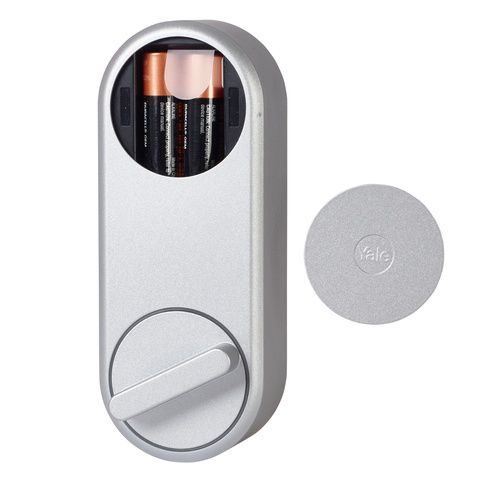
- Remove the battery cover from the Yale Linus® Smart Lock.
- Remove and replace all 4 batteries at the same time. The LEDs around the Thumbturn should light up.
FAQ
If you need additional support
You can get a more visual help related to our products at our download center and in our library for support videos.
Download Center
Support Videos

