To get the best performance from your Yale Smart Outdoor Camera, follow these mounting and setup tips:
1. Choose the Right Height
Mount the camera between 2.2 and 3.0 meters from the ground. This height provides a good balance between coverage and motion detection accuracy.
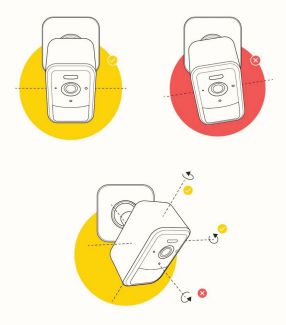
2. Angle the Camera Correctly
Tilt the camera slightly downward to focus on the area you want to monitor. This helps reduce false alerts from distant movement, such as traffic on a nearby street.
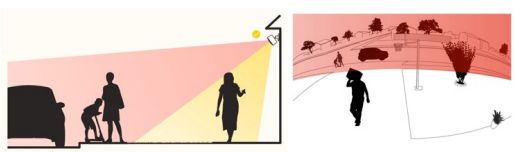
3. Understand the Detection Zone
The camera’s most sensitive area is in the lower half of its field of view. Positioning it correctly ensures better detection of people or vehicles entering your property.
4. Set Up Detection Zones
Use the Yale Home app to define custom detection zones. This minimizes unnecessary notifications from irrelevant areas.
5. Adjust Motion Sensitivity
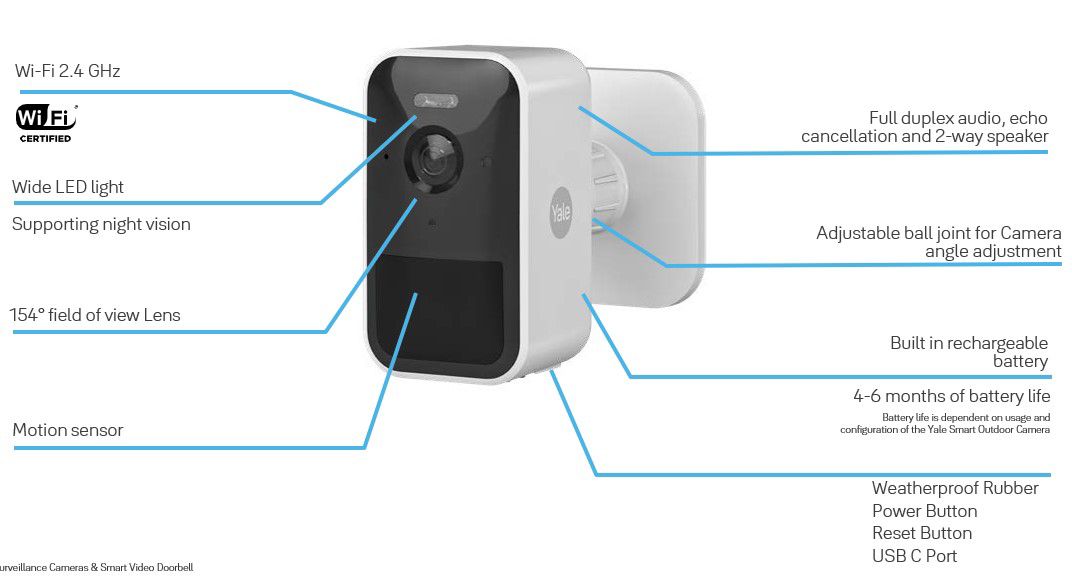
The camera uses a PIR motion sensor. In the Yale Home app, you can enter Motion Detection Sensitivity settings, which activate a test mode. The camera’s LED indicator will help you fine-tune the detection range—from approximately 3 meters to over 8 meters, depending on your chosen sensitivity level.
6. Optimize for Battery Life
Finding the right balance between viewing angle and motion sensitivity can significantly extend battery life. Avoid pointing the camera at constantly busy areas.
7. Revisit Settings Seasonally
Environmental temperature changes can affect motion detection. Revisit your sensitivity settings throughout the year to maintain optimal performance.