Yale Standard Digital Door Viewer 500
Getting Started
What's in the box?
- 3.2" LCD Display Screen x 1
- Camera x 1
- Fixtures & Fixings
- Batteries (2 x AAA)
What are the key features of the Yale Standard Digital Door Viewer 500?
- Live Viewing: See who’s at your door in real time.
- Wide Viewing Angle: 105-degree field of view for broad coverage.
- Flexible Fit: Compatible with various door types and thicknesses (38–110mm).
- Clear Display: 3.2" LCD screen provides a sharp image.
- Simple Operation: One-button activation.
- Auto Power-Off: Shuts off automatically after 10 seconds to save battery.
- Easy Installation: Fits standard 14mm hole; can replace mechanical viewers without extra work.
What are the specifications of the Yale Standard Digital Door Viewer 500?
- Fits standard 14mm hole from mechanical door viewer
- Size 125 x 68 x 15mm
- Weight 210g
- Door thickness 38-110mm
- 3.2" LCD screen
- 0.3 MP camera
- 2 pcs. AAA batteries
- Viewing angle 105 degree
Where should I install the Yale Standard Digital Door Viewer 500 on my door?
We recommend installing the the Doorviewer:
- At eye level
- Clear from obstructions on the door, for example a door knocker
- Flush against the door
Can the Yale Standard Digital Door Viewer 500 store images or video clips?
No it cannot. The Yale Standard Digital Door Viewer 500 is purpose-built for live, real-time viewing- giving you instant visual confirmation of who’s at your door. Its streamlined design focuses on simplicity and privacy, without storing images or videos, making it a hassle-free and secure solution for everyday use.
Support for Getting Started
Everyday Use
How do I live view my Yale Standard Digital Door Viewer 500?
To activate live view on your Yale Standard Digital Door Viewer 500, press the power button once to activate the screen. You can press the button again to turn off the screen manually, or it will automatically switch off after 10 seconds.
What is the expected battery life of the Yale Standard Digital Door Viewer 500?
The Yale Standard Digital Door Viewer 500 is powered by 2 AAA batteries and designed for energy efficiency. Thanks to its automatic shut-off feature after 10 seconds of use, the device can typically last between 2 to 6 months, depending on how frequently it's used. For best results, we recommend using high-quality alkaline batteries.
How do I change the batteries on my Yale Standard Digital Door Viewer 500?
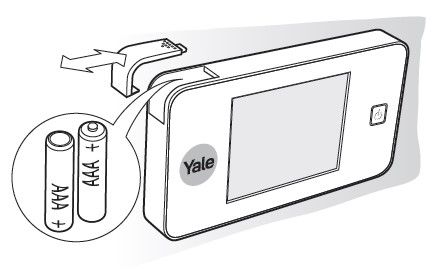
To change the batteries, simply push and slide the top left hand battery cover off, as shown in the image below. Be sure to insert the replacement batteries following the correct polarity as shown in the image.
Can I use rechargeable batteries in the Yale Standard Digital Door Viewer 500?
While it is technically possible to use rechargeable AAA batteries, we do not recommend it for the following reasons:
- Lower voltage: Rechargeable batteries typically provide 1.2V each, compared to 1.5V from alkaline batteries. With two batteries, this results in a 0.6V drop in total power, which can reduce performance and lead to more frequent battery replacements.
- Temperature sensitivity: Rechargeable batteries tend to perform poorly in cold environments. If the device is installed in a shed or garage, low temperatures during winter may affect battery efficiency and compromise reliability.
Is it possible to mount the Yale Standard Digital Door Viewer 500 outdoors, for example on an outdoor gate?
The Yale Standard Digital Door Viewer 500 internal view screen is not IP rated, meaning it is not waterproof or weather-resistant. As such, it is intended for indoor use only and should not be installed in areas exposed to rain or moisture.
Support for Everyday Use
Troubleshooting
I am struggling to see at night on my Yale Standard Digital Door Viewer 500
The viewer does not include infrared night vision. However, it can still provide a clear image at night if there is sufficient ambient lighting, such as from street lights or nearby security lights. If you are struggling to make out images at night, you will need to consider options to increase the ambient light level.
My Yale Standard Digital Door Viewer 500 is dead or unresponsive when I press the power button
If your Door Viewer is unresponsive, please check the following:
- Ensure that the batteries are inserted the correct way, following the polarity in the diagram below.
- Try changing the batteries for a fresh set of quality alkaline batteries.
The camera image on my Yale Standard Digital Door Viewer 500 is not working or has an issue when I press the power button
In this case, please follow the process below to troubleshoot:
- Carefully remove the viewer from the mount. Be careful when pulling it away, as the cable will be connected.
- Firstly, inspect the cable that runs from the camera and into the viewer. Ensure that it has not be pinched, trapped or damaged.
- Next, ensure the cable connector is securely plugged into the viewer, following the directional arrow.
Once these checks have been done and you have fitted the viewer back in place, please try the viewer again.
My Yale Standard Digital Door Viewer 500 screen is stuck on and will not respond to the power button
In this case, please manually reboot the device by removing the batteries for a few seconds and then re-inserting them, as per the image below.
The batteries on my Yale Standard Digital Door Viewer 500 are draining much quicker than expected
The Yale Standard Digital Door Viewer 500 is powered by 2 AAA batteries and designed for energy efficiency. Thanks to its automatic shut-off feature after 10 seconds of use, the device can typically last between 2 to 6 months, depending on how frequently it's used. If you are experiencing signficantly less than this, please check the points below.
- Avoid using rechargable batteries as these typically deliver a lower voltage (1.2V vs. 1.5V for alkaline), which will impact device performance and battery life. Additionally, they can be sensitive to cold temperatures, so if your device is installed in an unheated space like a shed or garage, winter conditions might affect reliability.
- Damage to the cable which runs from the camera and into the viewer could also impact battery life. Inspect this to ensure that it has not be pinched, trapped or damaged.
Support for Troubleshooting