Yale Digital Lock Battery Management Guide
Your Yale digital lock is your home’s primary line of defense. Because it runs on batteries, a sudden power failure can be incredibly frustrating. Fortunately, a few simple habits can completely prevent a lockout.
Here is a practical guide to keeping your Yale lock powered, with specific tips for managing India's varied climate.
How Your Yale Lock Uses Power
Yale smart locks like the YDME series, Luna, Zuri and Kyra function using the standard AA or AAA batteries, while more Premium or app-connected models like Luna Pro+ and Luna Elite use rechargeable alkaline lithium-ion battery packs instead, which handle temperature shifts better and reduce waste.
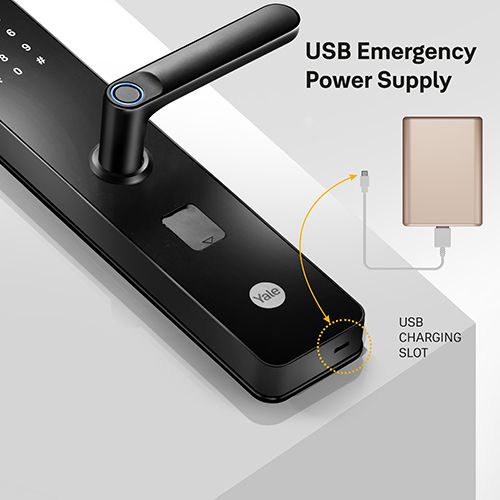
Every Yale lock features an emergency USB-C type port or a 9V battery terminal on the exterior faceplate. If your internal batteries die completely, this port allows you to jumpstart the lock from the outside, so you’re never locked out.
Check Your Specs First: Always verify your specific model's battery requirement in the Yale Home app or manual. Using the wrong battery type is the most common cause of false low-battery readings and early power failure.
5 Proactive Habits to Prevent Battery Failure
- Replace the entire set together: Always swap out all four or 8 batteries at once using fresh cells from the same pack. Mixing old and new batteries, or combining different brands, causes uneven power draw that triggers leaks and damages internal circuits.
- Stick to standard alkaline AA cells: Avoid rechargeable NiMH or "extended life" retail batteries unless explicitly recommended by Yale. Their lower voltage levels confuse the lock's internal sensors, causing false low-battery alerts.
- Enable app alerts: Turn on push notifications in the Yale Home App. It provides a standard low-battery warning followed by a critical alert, giving you weeks of advance notice to swap them out.
- Perform a monthly manual check: Lock and unlock your door physically a few times a month. This forced cycle refreshes the digital battery meter, helping you catch a dying set early if you primarily use the app.
- Stash a spare pack near the door: Keep a fresh set of AA alkaline batteries stored safely inside your home near the entryway for quick access.
Handling an Emergency Lockout
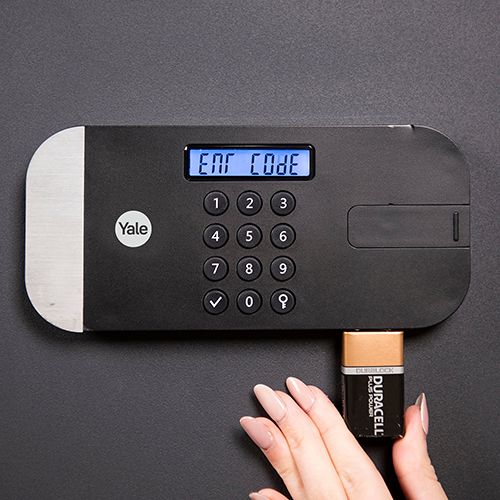
If the batteries drain completely and the keypad goes dark, you can bypass the shutdown using a standard 9V battery.
- Locate the terminals: External faceplate.
Find the two small metal contacts on the outside of the lock, typically located at the very bottom or near the base of the keypad.
- Apply the 9V battery: Maintain firm contact.
Press the posts of a fresh 9V battery firmly against these two metal contacts. Polarization doesn't matter for a jumpstart, but keep the battery pressed flat against the terminals to maintain the connection.
- Authorize entry:While holding the battery.
With the battery still held firmly in place, wait for the keypad to light up. Enter your PIN, tap your RFID card, or use your fingerprint as you normally would.
- Replace internal batteries: Immediate next step.
Once the door clicks open, keep it open and immediately replace the dead internal AA or lithium batteries to prevent getting locked out again.
Weatherproofing Your Battery Life in India
India’s intense heat, extreme humidity, and monsoon transitions significantly impact battery chemistry. Use these seasonal adjustments to protect your hardware:
-
Summer Heat: Avoid storing backup batteries in direct sunlight or inside cabinets on south- or west-facing walls that trap ambient heat. High temperatures accelerate the self-discharge rate of alkaline cells even when the lock is idle.
-
Monsoon Humidity: Heavy moisture causes micro-corrosion on metal contact points. Every few weeks, open the compartment and wipe the battery terminals down with a clean, dry microfiber cloth. Ensure the rubber seal on the battery cover is completely flush when closing it.
-
Coastal Environments: If you live in a coastal city like Mumbai or Chennai, salt air speeds up oxidation. A quick monthly wipe of the battery springs keeps the electrical current clean.
-
Winter & Hill Regions: Cold temperatures slow down the internal chemical reactions of a battery, making its voltage dip temporarily. If your lock is installed on an exposed or unheated entryway, don't panic if you see an early low-battery warning during colder months—just keep a fresh set handy.
Quick FAQ
- How long do the batteries usually last?
Standard household use typically yields 3 to 12 months of battery life depending on your daily usage, whether the lock relies on Wi-Fi or Bluetooth and local weather conditions.
- Can I use standard rechargeable AA batteries?
It is not recommended. Common rechargeable AA batteries output 1.2V instead of the 1.5V provided by standard alkalines. This lower baseline voltage causes the lock to misread the power levels as critically low.
- What if I don't have a 9V battery during a lockout?
Use the physical override key if your specific model features a traditional keyway. 9V battery is commonly available in any convenience store nearby, where you can purchase the battery. Contact customer care toll free no. for registering your complaint and team will attend to your issue onsite. Do not attempt to pry or force the hardware open.